
Rate limiting in Shoptet API operates at the level of server overload protection (DDoS). It does not limit the total number of queries or data volume — instead, it controls the number of simultaneous active connections to ensure the API remains stable, secure, and performant for all users.
Shoptet enforces limits on the number of concurrent active connections from a single source:
In addition to connection limits, Shoptet uses a leaky bucket algorithm to measure the efficiency and complexity of your API calls over time:
error 429Some URLs (e.g. for bulk operations) may have their own specific limits, which are documented individually for those endpoints.
The connection-level rate limiting is implemented via Nginx. Here is the underlying configuration that enforces these limits:
# Maximum 50 simultaneous connections from one IP address
limit_conn per_ip 50;

# Maximum 3 simultaneous connections for one token
limit_conn per_token 3;

# HTTP status code returned when limit is exceeded
limit_conn_status 429;
The leaky bucket algorithm is a token-based rate limiting system that measures not just the number of requests, but their complexity and resource impact. This is why we use “drops” as the unit — different requests have different weights.
Request comes in
Every API request tosses a number of “drops” into the bucket. The number depends on the complexity (response size, filters, data volume).
Drops are calculated post-execution
Shoptet calculates the complexity of a query after execution. The actual cost is based on the query results — more data = more drops.
Bucket leaks continuously
Every second, 10 drops are automatically removed from the bucket (if there are any), restoring capacity for future requests.
Full bucket = 429 error
If the bucket is full and there’s no space for new drops from an incoming request, you receive an HTTP 429 and must wait.
Every request has different demands on server resources:
Isolation is key: Each (add-on × project) pair has its own independent bucket. This prevents one misbehaving integration from impacting others.
Every API response includes headers that give you real-time visibility into your rate limit status. Use these to monitor your integration proactively and avoid hitting the limits.
X-RateLimit-Bucket-Filling
Present in every response. Shows current bucket usage as current/max (e.g., 130/200).
Retry-After
Present only when bucket is full. Contains a date-time value indicating when you can start requesting again.
Example: Bucket filling up
# Normal response — bucket at 130/200 (65% full)
HTTP/1.1 200 OK
X-RateLimit-Bucket-Filling: 130/200

# Bucket full — you must wait before retrying
HTTP/1.1 429 Too Many Requests
X-RateLimit-Bucket-Filling: 200/200
Retry-After: Mon, 01 Jul 2024 12:01:11 GMT
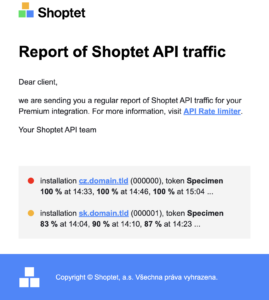
Shoptet proactively monitors your integrations and sends automated email reports to help you identify efficiency issues before they cause problems.
Shoptet sends emails twice daily — at 8 AM and 2 PM.
The emails retrospectively send aggregated data as a summary in a certain time box, which helps you in reverse investigation.
Emails contain color-coded indicators showing the health of your bucket:
Orange — your bucket was almost full. Investigate the root causes of your high API usage.
Red — your bucket is overloaded. Your integration was suspended in certain time windows. Immediate action required.
Note: It is not possible to change the destination email address — it must match the settings of the project (Premium) or add-on.
Emails are sent to the contact email listed with the add-on.

Emails go to the primary project contact. All premium e-shop owners are also informed with explanations and instructions.
Write endpoints (DELETE, PATCH, POST, PUT methods) can take longer to process and may be prone to two concurrent matching requests being sent at the same time. To prevent this, Shoptet uses a locking mechanism.
| Affected methods | DELETE, PATCH, POST, PUT |
| Error code | 423 Locked |
| Lock scope | Per specific URL |
| Max duration | 5 seconds |
Following these practices will help you avoid rate limit issues, keep your integration efficient, and ensure stable operation for your e-shop clients.
Always read the X-RateLimit-Bucket-Filling header in every response. Track your bucket usage and slow down or pause requests when it approaches 200/200.
When you receive a 429 response, always check the Retry-After header. Do not retry immediately — wait until the indicated timestamp before sending new requests.
Where available, prefer bulk endpoints over multiple individual requests. Fetching 100 products in one call is far more efficient than 100 separate calls, even if the bulk endpoint has its own per-request limits.
Since drops are based on complexity, reduce unnecessary data fetching: use pagination efficiently, apply specific filters, request only the fields you need, and avoid broad queries on large datasets.
Avoid repeating identical API calls for data that rarely changes (e.g. brand details, categories).
Instead of polling at a fixed interval, subscribe to webhook events and only fetch data when something changes.
When you receive orange or red indicator emails, take them seriously. Analyze which endpoints are generating the most drops and optimize those integrations as a priority.
Here are the HTTP status codes related to rate limiting that your integration needs to handle:
| Status Code | Name | Cause | Action |
|---|---|---|---|
| 429 | Too Many Requests | Connection limit exceeded (per IP or per token), OR leaky bucket is full. | Check Retry-After header and wait before retrying. |
| 423 | Locked | Duplicate write request sent while a matching request is still being processed. | Wait and retry after a short delay (max 5 seconds for lock to expire). |
Retry-AfterX-RateLimit-Bucket-FillingHave questions? If you have questions or concerns, please contact us at api@shoptet.cz or reach out to your partner manager. We are ready to help you as much as we can.