# Frontend news from January 28, 2025

URL: https://shoptet.dev/news/frontend/frontend-news-from-january-28-2025

January 28, 2025 · 6 min read
Pavel Husa

## Template designer

The Template Designer is a new interface for editing existing templates. As the beta version launch for all users approaches, we would like to provide you with early access to the new editor ahead of regular users. In the coming days, we will enable the Template Designer on your partner testing projects.

![](/assets/images/image-12-aaecf2138ee55abd219443fa4d809c0d.png)

## Breaking Changes

### Accessibility of phone number

Due to accessibility improvements, we changed the wrapper of the phone number. This change will be deployed in the upcoming days. Now, the phone number in the header on the Techno, Tango, and Classic templates is wrapped inside a `<a>` , even when it doesn't contain a phone number. We removed the href when the incorrect phone is there.
![](/assets/images/screenshot-2025-01-28-at-14.35.58-edd570ba2e3637da92014bc8d7b96f48.png)

### Techno product list

In the upcoming days we release the refactor of the product list in the Techno template. Now the grid is handled by JavaScript to ensure the mansory layout. The refactor is using CSS grid. There are no changes in DOM. We remove `same_height_set` and `same_height_breakpoint` abilities and `sameHeightOfProductsLoop` , `setHeightOfBigProduct` , `sameHeightOfProducts` .

### Back to e-shop button (via [Deferred Template Updates](/templates/deferred-template-updates/) )

We added the Back to e-shop button to multiple places. Based on your feedback, we will provide more detailed information.

The change is scheduled for release on **February 18, 2025** . If you are an addon developer, please review the changes described below now and adjust your addons accordingly. On the release date, these improvements will be rolled out to the majority of customers. E-shops using Deferred Template Updates will have **time until March 4, 2025 to modify their customizations** and accept the update.

You can preview the changes by running the command `shoptet.helpers.enableUpdatePreview('back_to_shop_buttons')` in the browser console.

#### Advanced Order

We Added the new "Back to shop" button to the advanced order `<button type="button" class="btn next-step-back colorbox-close">Back to shop</button>` and a new wrapper with the class `advancedOrder__buttons` was created, which contains the button "Back to shop" and the button "Shopping cart".

```html
<div class="advancedOrder__buttons">
  <button type="button" class="btn next-step-back colorbox-close">Zpět do obchodu</button>
  <a href="/kosik/" class="btn btn-conversion" rel="nofollow">Nákupní košík</a>
</div>
```

![](/assets/images/400655188-a51823e9-1be7-4fde-98a3-8bc18a6ba03d-8d8f89a04b0f4f26817908345199506e.png)

#### Cart and the checkout process

In the Techno, Tango, and Step templates, the element `<a>` was replaced with `<button type="button">` in the cart modal window.
Added the `.btn` and `.btn-lg` classes. The `.toggle-window` class is added to the button for handling with cart modal. The `.toggle-trigger` class has been removed and is no longer used for handling windows.
![](/assets/images/403174014-ed9f2e0b-c1c8-49bf-8c75-4734946059b7-5555d6adf87e66a79e574a773bc55837.png)

#### Techno specific changes

**Search, Cart, Login, Registration**
– Element `<a href="#">` was replaced with `<button type="button">` .
– Added the `.btn` class.
– Classes `.toggle-window-arr` and `.btn` are for CSS styling only.
– Functionality is handled by the `.toggle-window` and `.hide-content-windows` classes.

![](/assets/images/402989585-c7eac58d-2bf7-4471-a553-c767449ea58c-fed869b2af0a163ee5feed02a092118b.png)

#### Tango specific changes

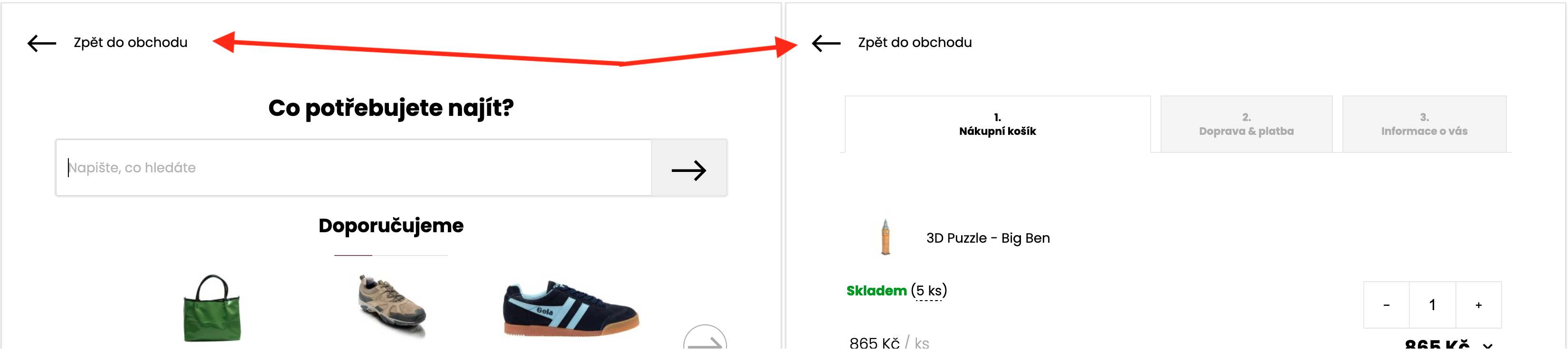
**Search, Cart (window)**
– Element `<a href="#">` was replaced with `<button type="button">` .
– Added the `.btn` class.
– Classes `.toggle-window-arr` and `.btn` are for CSS styling only.
– Functionality is handled by the `.toggle-window` class.
![](/assets/images/403086900-11354a6e-b4de-4f27-aeb9-23e86266abc5-cd496fc5effc60ac30104ee634ac039e.png)

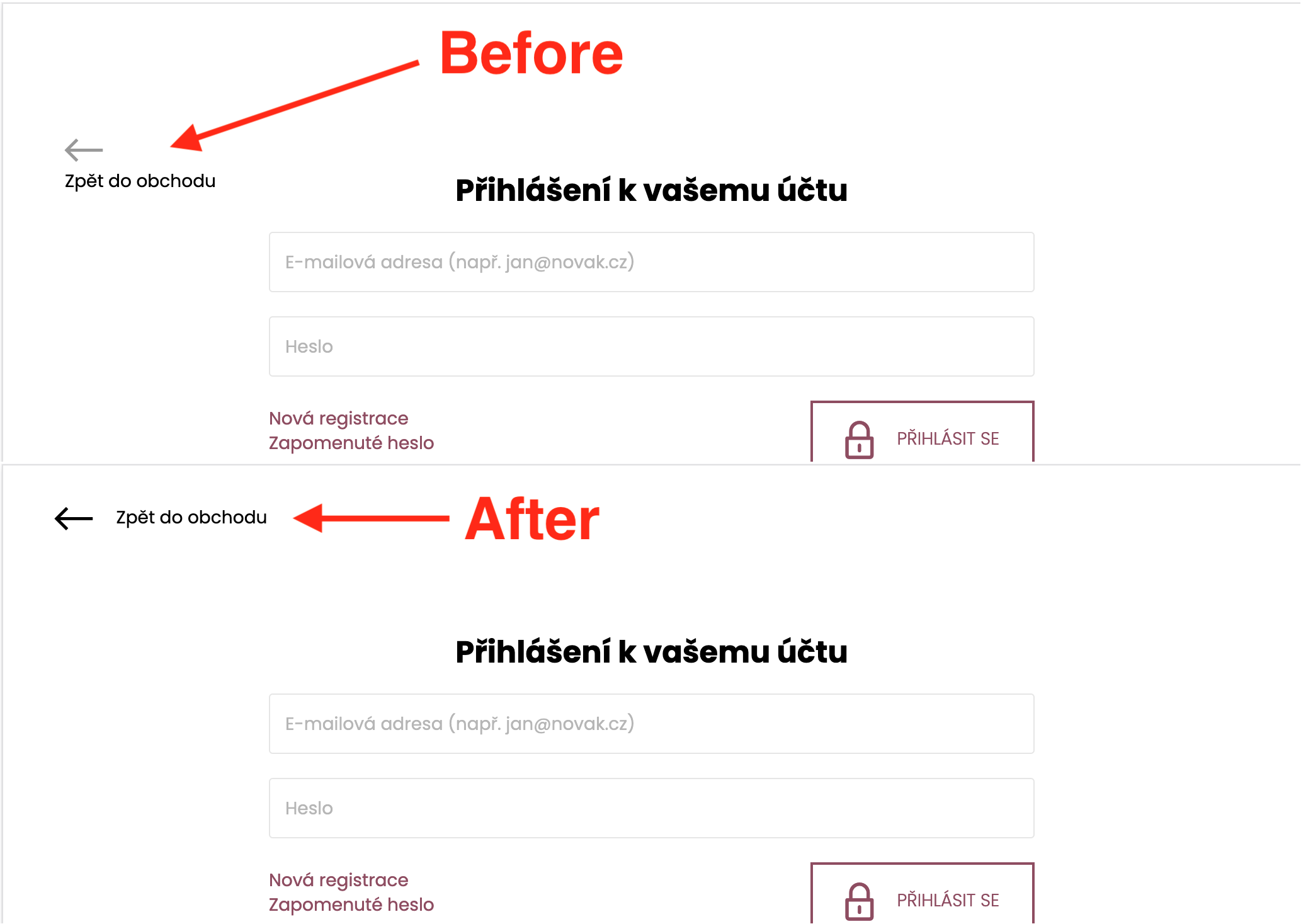
**Login, Registration**
– Element `<a href="#" class="toggle-window-arr"><span class="continue-shopping">Zpět do obchodu</span></a>` was replaced with `<button type="button" class="btn toggle-window-arr toggle-window">Zpět <span>do obchodu</span></button>` . This change unified back buttons with buttons in the search window and cart window.
– Moved in the HTML structure as a direct child of the `<div>` with the class `.login-window-in` .
– Classes `.toggle-window-arr` and `.btn` are for CSS styling only.
– Functionality is handled by the `.toggle-window` class.
![](/assets/images/403088515-15e7dc07-cb65-427b-8cb2-87aff5a50eb1-0d49b786a2d06ce23d9ca20299258a3d.png)

**Cart (checkout process), Checkout**
– Removed class `.next-step-back` , added classes `.btn` and `.toggle-window-arr`
– The internal part of the link `<span class="continue-shopping">Zpět do obchodu</span>` was replaced with `Zpět <span>do obchodu</span>`

![](/assets/images/403117059-18c83cfe-8a9f-46ff-b6ef-69f050f173f4-e83f2edf13e2ebaef2d1539f031fd928.png)

#### Step specific changes

**Search, Cart (window)**
– Element `<a href="#">` was replaced with `<button type="button">` .
– Added the `.btn` class.
– Classes `.toggle-window-arr` and `.btn` are for CSS styling only.
– Functionality is handled by the `.toggle-window` class.
![](/assets/images/403137726-a16053d9-2156-44c5-8e9e-8b0e135023aa-2-3885361a697d0c07a65ef79304d3b655.png)

**Login (window)**
– Element `<a href="#" class="toggle-window-arr"><span class="continue-shopping">Zpět do obchodu</span></a>` was replaced with `<button type="button" class="btn toggle-window-arr toggle-window">Zpět <span>do obchodu</span></button>` . This change unified back buttons with buttons in the search window and cart window.
– Moved in the HTML structure as a direct child of the `<div>` with the class `.login-window-in` .
– Classes `.toggle-window-arr` and `.btn` are for CSS styling only.
– Functionality is handled by the `.toggle-window` class.
![](/assets/images/403137849-757090ad-40b0-43b2-9f54-c31d7dfac55d-bc3296cdc335c945e558e20b967a348c.png)

**Cart (checkout process), Checkout**
– Removed class `.next-step-back` , added classes `.btn` and `.toggle-window-arr`
– The internal part of the link `<span class="continue-shopping">Zpět do obchodu</span>` was replaced with `Zpět <span>do obchodu</span>`
![](/assets/images/403148629-0e8c7009-549e-40bd-a5db-cb4f80e7c214-b84512ae00b8bab554eb23822a634fa2.png)

#### Other changes

- In the Classic and Samba template, the hidden unused "Back to shop" link has been removed along with the wrapper `div.back-shopping-link` .
- The entire component was placed as the last element in `div#checkoutContent` (first and second step of the checkout process) and for Classic only, also in the cart in `div#cart-wrapper` .
- The `.toggle-window-arr` class will no longer be used for handling windows. Therefore, it was replaced with `.toggle-window` for the close button in the search widget for Samba template.

## Improvements

### Configurable speed for 360° image rotation

Everyone can adjust the speed of 360° image rotation now. Before this, the speed was hardcoded to 100 ms. In custom codes in `Zápatí` you can try include this code `<script>shoptet.config.image360RotationSpeed=200</script>` and adjust the speed to your needs.

## Bugfixes

#### Pickup point in the checkout

We fixed the branch selection in the checkout process which wasn't clickable in some cases.

#### Color shceme inconsistency

We fixed the color scheme inconsistency in the second step of the checkout. The `Zdarma` text is now corresponds to the color settings.

## What we plan in upcoming days:

- fix keyboard accessibility of phone number in "Need Help?" section
- fix keyboard accessibility of quantity buttons
- modals improvements

**Tags:**
- [Frontend](/news/tags/frontend/)